> ## Documentation Index
> Fetch the complete documentation index at: https://rendobar-docs-compose-ref-tables.mintlify.site/llms.txt
> Use this file to discover all available pages before exploring further.
# Run FFmpeg from your terminal
> Install the rb binary, sign in, and run any ffmpeg command in the cloud from your shell. Local files upload and download for you.
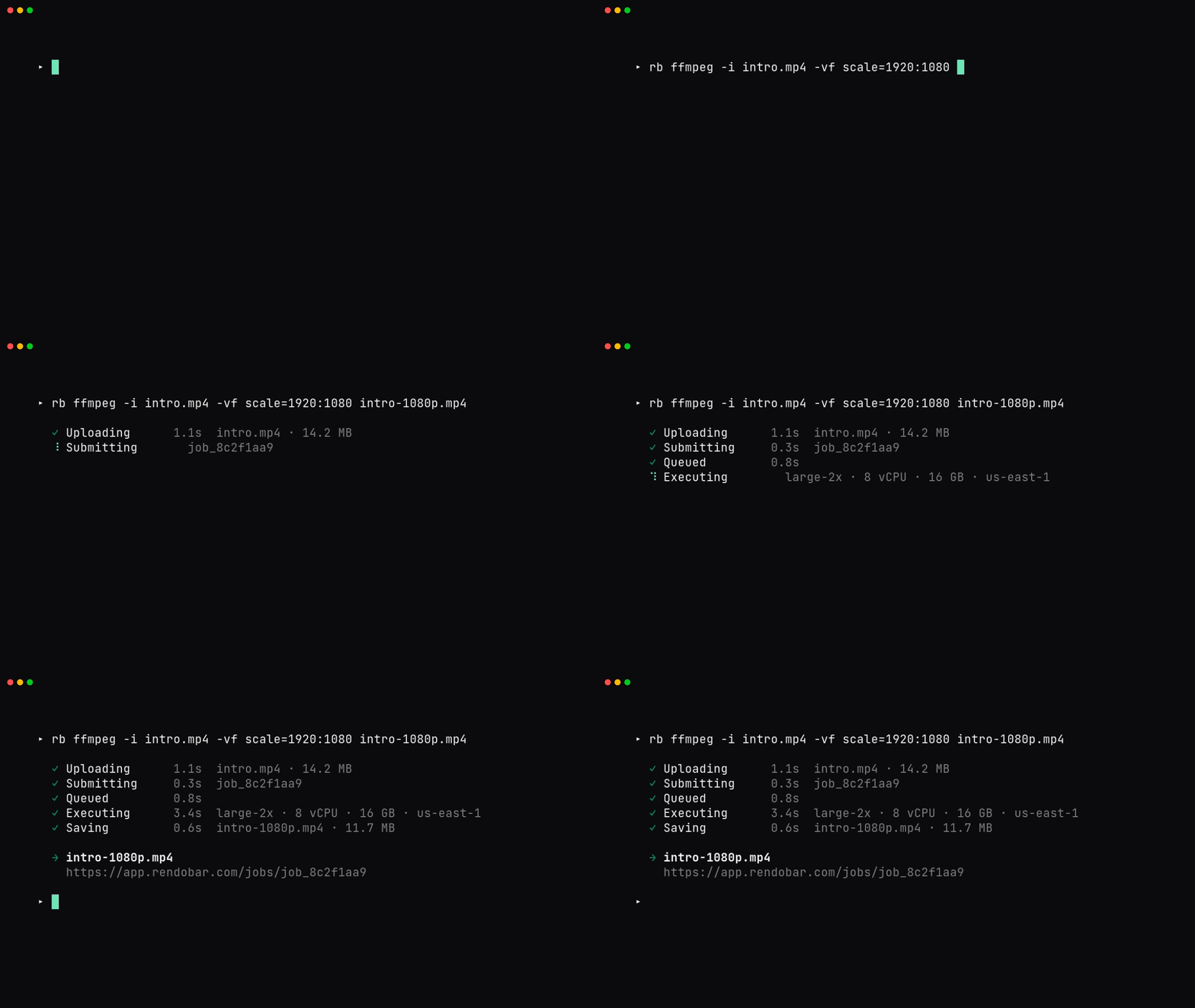
`rb` runs FFmpeg in the cloud from your shell. Write the same `ffmpeg` command you'd run locally, prefix it with `rb`, and it uploads your inputs, runs the job, and downloads the result.
 ```bash theme={null}
curl -fsSL https://rendobar.com/install.sh | sh
rb login
rb ffmpeg -i clip.mp4 -vf scale=1280:720 -c:v libx264 -crf 23 out.mp4
```
That's the whole loop. `rb login` opens your browser for OAuth. The render command uploads `clip.mp4`, runs an [`ffmpeg`](/jobs/ffmpeg) job, and writes the output to `out.mp4`. Progress goes to stderr, so stdout stays clean for piping.
For a Node or TypeScript program, or for any job type other than `ffmpeg`, use the [SDK](https://www.npmjs.com/package/@rendobar/sdk) instead. The CLI runs `ffmpeg` jobs and the auth around them, nothing else.
## Install
```bash theme={null}
curl -fsSL https://rendobar.com/install.sh | sh
```
```powershell theme={null}
irm https://rendobar.com/install.ps1 | iex
```
The installer pulls the matching release from [github.com/rendobar/cli/releases](https://github.com/rendobar/cli/releases), checks a SHA-256, drops `rb` at `~/.rendobar/bin/rb` (or `%USERPROFILE%\.rendobar\bin\rb.exe`), and adds it to your PATH. Open a new shell, then verify:
```bash theme={null}
rb --version
rb doctor
```
To pin a version for a Dockerfile or provisioning script, set `RENDOBAR_VERSION` before piping:
```bash theme={null}
RENDOBAR_VERSION=v1.0.0 curl -fsSL https://rendobar.com/install.sh | sh
```
`rb update` self-replaces the binary in place (SHA-256 verified, rolls back on failure). To remove `rb`, run `curl -fsSL https://rendobar.com/uninstall.sh | sh` (or the `.ps1` on Windows).
## Authenticate
The CLI reads credentials in priority order: the `RENDOBAR_API_KEY` env var, then a saved API key, then a saved OAuth token.
```bash theme={null}
rb login # browser OAuth, saves a refreshing token
rb login --key rb_xxx # paste a key for headless or SSH sessions
rb whoami # print org, plan, balance
rb logout # revoke the token and delete the credential file
```
`rb login` runs an OAuth 2.1 PKCE flow on `http://127.0.0.1:14832/callback`. Access tokens expire after 1 hour and refresh automatically, so you won't see a re-login prompt unless the token is revoked. Credentials live at `~/.config/rendobar/credentials.json` (`%APPDATA%\rendobar\credentials.json` on Windows). Treat that file as a secret.
Get an API key from [app.rendobar.com](https://app.rendobar.com) under Settings, API keys. Keys start with `rb_`.
## Commands
| Command | What it does |
| ------------------------ | ----------------------------------------------------------------------------------------- |
| `rb ffmpeg ` | Run FFmpeg in the cloud. Pass real `ffmpeg` flags. Local `-i` inputs upload automatically |
| `rb login [--key ]` | Sign in via browser OAuth, or save an API key with `--key` |
| `rb logout` | Revoke the token and delete the credential file |
| `rb whoami` | Print the current org, plan, and balance |
| `rb doctor [--fix]` | Run install and connectivity checks. `--fix` clears the macOS quarantine bit |
| `rb update` | Update `rb` to the latest release |
### rb ffmpeg flags
These flags belong to `rb ffmpeg`. Everything else after the subcommand passes through to FFmpeg verbatim.
| Flag | Effect |
| ------------- | --------------------------------------------------------------------- |
| `--json` | Print the full job result as JSON to stdout |
| `--url-only` | Print only the signed result URL to stdout |
| `--quiet` | Print nothing. Read the exit code |
| `--no-wait` | Submit and exit, printing the job ID |
| `--timeout N` | Server-side execution timeout in seconds. Range 1 to 900, default 120 |
Local inputs (`-i ./clip.mp4`) upload before submission and are rewritten to short-lived URLs. Remote inputs (`-i https://...`) pass through untouched. The trailing output filename is where the result downloads to.
### Exit codes
| Code | Meaning |
| ----- | ------------------------------------------------------------------------ |
| `0` | Success |
| `1` | Job failed, or a generic runtime error |
| `2` | Not authenticated, bad arguments, port in use, or insufficient credits |
| `130` | Cancelled with `Ctrl+C`. The CLI tries to cancel the in-flight job first |
## Run it in CI
`RENDOBAR_API_KEY` is the only auth path for CI. It beats any saved credential and writes nothing to disk. Don't run `rb login` in a pipeline, the browser flow will hang.
```yaml title=".github/workflows/render.yml" theme={null}
jobs:
render:
runs-on: ubuntu-latest
steps:
- uses: actions/checkout@v4
- name: Install Rendobar CLI
run: |
curl -fsSL https://rendobar.com/install.sh | sh
echo "$HOME/.rendobar/bin" >> "$GITHUB_PATH"
env:
RENDOBAR_VERSION: v1.0.0
- name: Render
run: rb ffmpeg -i ./input.mp4 -c:v libx264 -crf 23 out.mp4
env:
RENDOBAR_API_KEY: ${{ secrets.RENDOBAR_API_KEY }}
- uses: actions/upload-artifact@v4
with:
name: rendered
path: out.mp4
```
`install.sh` updates PATH via shell rc files that later steps don't read, so the `echo … >> "$GITHUB_PATH"` line carries the install dir forward. The same pattern works in GitLab CI or Docker: install with `RENDOBAR_NO_MODIFY_PATH=1`, pass the key as a masked secret, and parse output with `--json` or `--url-only`.
```bash theme={null}
URL=$(rb ffmpeg --url-only -i in.mp4 -c:v libx264 out.mp4)
rb ffmpeg --json -i in.mp4 -c:v libx264 out.mp4 | jq -r '.id'
```
The CLI has no `--idempotency-key`. If a retried step must not double-charge, submit via the [SDK](https://www.npmjs.com/package/@rendobar/sdk) or [`POST /jobs`](/jobs/ffmpeg) with an `idempotencyKey` field.
## Common fixes
`rb doctor` runs the install and connectivity checks and prints a `fix:` line under any failure. Run it first. The three you'll actually hit:
The shell hasn't reloaded. Open a new terminal, or `source ~/.zshrc` / `~/.bashrc`. If you set `RENDOBAR_NO_MODIFY_PATH=1` or a custom `RENDOBAR_INSTALL_DIR`, add it yourself: `export PATH="$HOME/.rendobar/bin:$PATH"`.
GitHub Releases rate-limits at 60/hr per IP when unauthenticated. Pass a token: `RENDOBAR_GITHUB_TOKEN=ghp_xxx curl -fsSL https://rendobar.com/install.sh | sh`. In GitHub Actions the default `GITHUB_TOKEN` is picked up automatically.
Another process holds the OAuth callback port, or your network blocks loopback HTTP. Skip the browser entirely: `rb login --key rb_xxx`. A `Refresh failed: invalid_grant` means the token was revoked, so run `rb logout && rb login`.
For anything else, run `rb doctor --json` and file a bug at [github.com/rendobar/cli/issues](https://github.com/rendobar/cli/issues).
## See also
* [FFmpeg job reference](/jobs/ffmpeg): the API the CLI calls per run
* [API authentication](/quickstart): keys and OAuth across REST and MCP
* [SDK](https://www.npmjs.com/package/@rendobar/sdk): every job type, typed, for Node and TypeScript
* [Changelog](https://rendobar.com/changelog/): version history and release notes
```bash theme={null}
curl -fsSL https://rendobar.com/install.sh | sh
rb login
rb ffmpeg -i clip.mp4 -vf scale=1280:720 -c:v libx264 -crf 23 out.mp4
```
That's the whole loop. `rb login` opens your browser for OAuth. The render command uploads `clip.mp4`, runs an [`ffmpeg`](/jobs/ffmpeg) job, and writes the output to `out.mp4`. Progress goes to stderr, so stdout stays clean for piping.
For a Node or TypeScript program, or for any job type other than `ffmpeg`, use the [SDK](https://www.npmjs.com/package/@rendobar/sdk) instead. The CLI runs `ffmpeg` jobs and the auth around them, nothing else.
## Install
```bash theme={null}
curl -fsSL https://rendobar.com/install.sh | sh
```
```powershell theme={null}
irm https://rendobar.com/install.ps1 | iex
```
The installer pulls the matching release from [github.com/rendobar/cli/releases](https://github.com/rendobar/cli/releases), checks a SHA-256, drops `rb` at `~/.rendobar/bin/rb` (or `%USERPROFILE%\.rendobar\bin\rb.exe`), and adds it to your PATH. Open a new shell, then verify:
```bash theme={null}
rb --version
rb doctor
```
To pin a version for a Dockerfile or provisioning script, set `RENDOBAR_VERSION` before piping:
```bash theme={null}
RENDOBAR_VERSION=v1.0.0 curl -fsSL https://rendobar.com/install.sh | sh
```
`rb update` self-replaces the binary in place (SHA-256 verified, rolls back on failure). To remove `rb`, run `curl -fsSL https://rendobar.com/uninstall.sh | sh` (or the `.ps1` on Windows).
## Authenticate
The CLI reads credentials in priority order: the `RENDOBAR_API_KEY` env var, then a saved API key, then a saved OAuth token.
```bash theme={null}
rb login # browser OAuth, saves a refreshing token
rb login --key rb_xxx # paste a key for headless or SSH sessions
rb whoami # print org, plan, balance
rb logout # revoke the token and delete the credential file
```
`rb login` runs an OAuth 2.1 PKCE flow on `http://127.0.0.1:14832/callback`. Access tokens expire after 1 hour and refresh automatically, so you won't see a re-login prompt unless the token is revoked. Credentials live at `~/.config/rendobar/credentials.json` (`%APPDATA%\rendobar\credentials.json` on Windows). Treat that file as a secret.
Get an API key from [app.rendobar.com](https://app.rendobar.com) under Settings, API keys. Keys start with `rb_`.
## Commands
| Command | What it does |
| ------------------------ | ----------------------------------------------------------------------------------------- |
| `rb ffmpeg ` | Run FFmpeg in the cloud. Pass real `ffmpeg` flags. Local `-i` inputs upload automatically |
| `rb login [--key ]` | Sign in via browser OAuth, or save an API key with `--key` |
| `rb logout` | Revoke the token and delete the credential file |
| `rb whoami` | Print the current org, plan, and balance |
| `rb doctor [--fix]` | Run install and connectivity checks. `--fix` clears the macOS quarantine bit |
| `rb update` | Update `rb` to the latest release |
### rb ffmpeg flags
These flags belong to `rb ffmpeg`. Everything else after the subcommand passes through to FFmpeg verbatim.
| Flag | Effect |
| ------------- | --------------------------------------------------------------------- |
| `--json` | Print the full job result as JSON to stdout |
| `--url-only` | Print only the signed result URL to stdout |
| `--quiet` | Print nothing. Read the exit code |
| `--no-wait` | Submit and exit, printing the job ID |
| `--timeout N` | Server-side execution timeout in seconds. Range 1 to 900, default 120 |
Local inputs (`-i ./clip.mp4`) upload before submission and are rewritten to short-lived URLs. Remote inputs (`-i https://...`) pass through untouched. The trailing output filename is where the result downloads to.
### Exit codes
| Code | Meaning |
| ----- | ------------------------------------------------------------------------ |
| `0` | Success |
| `1` | Job failed, or a generic runtime error |
| `2` | Not authenticated, bad arguments, port in use, or insufficient credits |
| `130` | Cancelled with `Ctrl+C`. The CLI tries to cancel the in-flight job first |
## Run it in CI
`RENDOBAR_API_KEY` is the only auth path for CI. It beats any saved credential and writes nothing to disk. Don't run `rb login` in a pipeline, the browser flow will hang.
```yaml title=".github/workflows/render.yml" theme={null}
jobs:
render:
runs-on: ubuntu-latest
steps:
- uses: actions/checkout@v4
- name: Install Rendobar CLI
run: |
curl -fsSL https://rendobar.com/install.sh | sh
echo "$HOME/.rendobar/bin" >> "$GITHUB_PATH"
env:
RENDOBAR_VERSION: v1.0.0
- name: Render
run: rb ffmpeg -i ./input.mp4 -c:v libx264 -crf 23 out.mp4
env:
RENDOBAR_API_KEY: ${{ secrets.RENDOBAR_API_KEY }}
- uses: actions/upload-artifact@v4
with:
name: rendered
path: out.mp4
```
`install.sh` updates PATH via shell rc files that later steps don't read, so the `echo … >> "$GITHUB_PATH"` line carries the install dir forward. The same pattern works in GitLab CI or Docker: install with `RENDOBAR_NO_MODIFY_PATH=1`, pass the key as a masked secret, and parse output with `--json` or `--url-only`.
```bash theme={null}
URL=$(rb ffmpeg --url-only -i in.mp4 -c:v libx264 out.mp4)
rb ffmpeg --json -i in.mp4 -c:v libx264 out.mp4 | jq -r '.id'
```
The CLI has no `--idempotency-key`. If a retried step must not double-charge, submit via the [SDK](https://www.npmjs.com/package/@rendobar/sdk) or [`POST /jobs`](/jobs/ffmpeg) with an `idempotencyKey` field.
## Common fixes
`rb doctor` runs the install and connectivity checks and prints a `fix:` line under any failure. Run it first. The three you'll actually hit:
The shell hasn't reloaded. Open a new terminal, or `source ~/.zshrc` / `~/.bashrc`. If you set `RENDOBAR_NO_MODIFY_PATH=1` or a custom `RENDOBAR_INSTALL_DIR`, add it yourself: `export PATH="$HOME/.rendobar/bin:$PATH"`.
GitHub Releases rate-limits at 60/hr per IP when unauthenticated. Pass a token: `RENDOBAR_GITHUB_TOKEN=ghp_xxx curl -fsSL https://rendobar.com/install.sh | sh`. In GitHub Actions the default `GITHUB_TOKEN` is picked up automatically.
Another process holds the OAuth callback port, or your network blocks loopback HTTP. Skip the browser entirely: `rb login --key rb_xxx`. A `Refresh failed: invalid_grant` means the token was revoked, so run `rb logout && rb login`.
For anything else, run `rb doctor --json` and file a bug at [github.com/rendobar/cli/issues](https://github.com/rendobar/cli/issues).
## See also
* [FFmpeg job reference](/jobs/ffmpeg): the API the CLI calls per run
* [API authentication](/quickstart): keys and OAuth across REST and MCP
* [SDK](https://www.npmjs.com/package/@rendobar/sdk): every job type, typed, for Node and TypeScript
* [Changelog](https://rendobar.com/changelog/): version history and release notes